
Unlock the Secret to Effortless Wealth Tracking: How Interactive Brokers’ Auto-Email Statements Can Revolutionize Your Investment Game!
Ever wonder how much time you might be wasting logging into your trading platform just to check your statements? If you’re like me—or a few pals of mine in Singapore who recently jumped on the Interactive Brokers bandwagon—you might not even realize you can have your daily or monthly reports delivered straight to your inbox. Yep, that means no more juggling passwords or navigating complicated menus just to find your financial snapshot. And here’s a thought: in an age where AI can piece together financial histories like a detective on a hot trail, having all your statements at your fingertips can be a true game changer. So, whether you’re a numbers nerd wanting to reconcile every cent or just someone who prefers their reports served dashed with convenience and a side of automation, this guide—with handy screenshots—will walk you through exactly where to find these settings and how to customize reports that make sense for you. Ready to take control of your financial info without breaking a sweat? Let’s dive in. LEARN MORE
img#mv-trellis-img-1::before{padding-top:38.37890625%; }img#mv-trellis-img-1{display:block;}img#mv-trellis-img-2::before{padding-top:72.0703125%; }img#mv-trellis-img-2{display:block;}img#mv-trellis-img-3::before{padding-top:23.14453125%; }img#mv-trellis-img-3{display:block;}img#mv-trellis-img-4::before{padding-top:37.79296875%; }img#mv-trellis-img-4{display:block;}img#mv-trellis-img-5::before{padding-top:75.1953125%; }img#mv-trellis-img-5{display:block;}img#mv-trellis-img-6::before{padding-top:38.18359375%; }img#mv-trellis-img-6{display:block;}img#mv-trellis-img-7::before{padding-top:63.96484375%; }img#mv-trellis-img-7{display:block;}img#mv-trellis-img-8::before{padding-top:71.484375%; }img#mv-trellis-img-8{display:block;}img#mv-trellis-img-9::before{padding-top:85.3515625%; }img#mv-trellis-img-9{display:block;}img#mv-trellis-img-10::before{padding-top:60.7421875%; }img#mv-trellis-img-10{display:block;}img#mv-trellis-img-11::before{padding-top:103.70774263904%; }img#mv-trellis-img-11{display:block;}img#mv-trellis-img-12::before{padding-top:25.78125%; }img#mv-trellis-img-12{display:block;}img#mv-trellis-img-13::before{padding-top:75.1953125%; }img#mv-trellis-img-13{display:block;}
A few Singaporean friends of mine recently signed up for Interactive Brokers, I think in the last few months, so they might not know about this.
You can set up daily or monthly reports to be sent straight to your email.
That saves a lot of time, since you don’t have to log into the system every time, and I think we all check our email more often anyway. It also lets you archive the statements if you want to keep them.
I think that even if you don’t want to care about all this information, in this day and age with AI, you could piece together your past financial history if you wanted to. Sometimes you really need the actual statements. If you can download all of them now, then even if you don’t need the information regularly, you can reconcile some of it later with the help of AI. But if you don’t have the statements, you’ll have a problem.
In this post, I’m showing you the screenshots so you can see exactly where to find all of these settings.
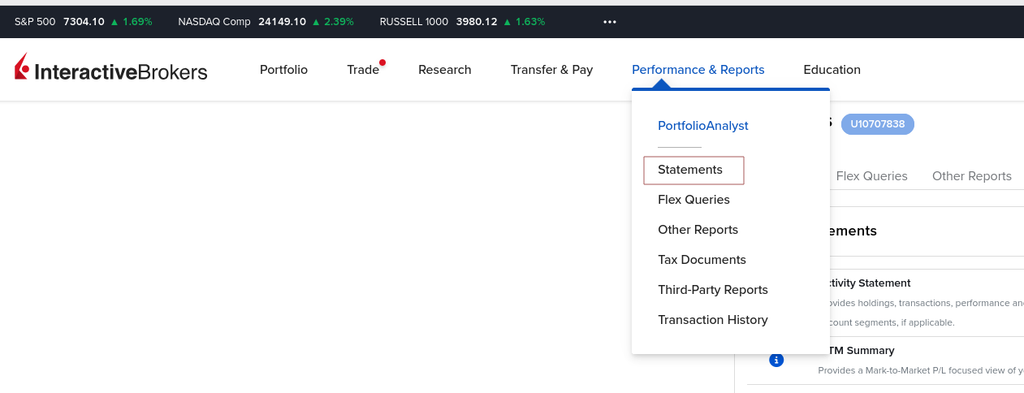
Where to Find Statement Settings: Performance & Reports > Statements

In Interactive Brokers, go to Performance & Reports > Statements, then click the gear icon at the top right to open Statement delivery.

You’ll be taken to this statements page over here. It looks a little busy, but the first thing you’ll need to do is click the gear icon in the top right corner.
3 Default Statements: Which Should You Email Yourself?

Statement delivery is where you tell the system how you want your statements to go.
I think the main focus here is the default statements.
Interactive Brokers comes with some defaults, and as you can see, the delivery I set here has daily activity disabled. The monthly activity statement is sent by email with an attachment, and the daily trade report is also sent by email with attachments.
If you want to change any of these, you can click the gear icon on the right side.

I think there aren’t a lot of options here.
It’s usually email with attachments, so the question is which of these three you want to send by default.

The daily trade report goes out to your email every day you make trades, and it tells you what you bought and sold. If I remember right, you should already be getting this one by default.
The monthly activity statement shows a lot more information about your overall activity. I don’t think this one is set up by default, so you may need to toggle it to email with attachment. Once you do, they’ll collect everything at the end of each month and send it to you at the start of the next month.
I think once you have set this you should be good to go. You should be able to receive these daily trade reports and these monthly activity reports.
Custom Reports: The 3 I Email Myself (Cash/Trades, Cash Movements, Dividends)

Now that you’re here, let me show you the custom reports.
There aren’t a lot of built-in options, but you can set up custom reports that are more tailored to what you need. In the screenshot, I’ve created three of them.
The first one is the cash, dividend and trades report. It contains just the cash dividends and trades, and it comes out as a PDF.
The second one is the combined deposits and withdrawals report, which is a CSV. It lets me see the cash movements in more detail. At a certain point I realized I hadn’t been keeping track of these movements, and that makes it hard to reconcile later. If I can pull this one every month and download it, I can keep my records up to date, and it’ll be easier to move everything into another system if I ever need to.
The third one is the dividends report, also a CSV. It shows the dividends paid, the withholding tax, and the accruals.

Next, you click the gear icon on the previous screen.
That takes you to the configure delivery settings screen.
Right now, the delivery method is only email, but it looks like you can request FTP if you need it.
Each report also lets you pick a format once it’s created: HTML, PDF, or CSV. CSV is the easiest one for an AI LLM to process, of course.

Now, to make a custom report, go back to the statements page. There’s this crossover here where my mouse cursor is. Click the button.


Now you can select all, or you don’t have to, and pick specific things yourself.
There’s a whole bunch of options, so my advice is to start by selecting just a few and then generate the report.
You can run it right away, so you’ll see quickly whether this is something you want on a daily or monthly basis.
I’m sharing this because it might work for some of you and not for others.
For me, the main need is dividends. I want to find out which securities in Crystalys have dividend withholding tax, so I can calculate the figures quickly. I usually enter them into my custom application at the start of the month if I can, or I use the rest of the month to do it. The dividend report helps a lot with that.
PortfolioAnalyst Reports: Money-Weighted Returns by Region and Weight
Now there’s this Portfolio Analyst Report.
It’s a landscape report with a lot of information about your money-weighted returns, which is probably the same thing you’d see in your portfolio, but it can break down whatever you own by geographic region and by weight.
You can find it at the link below.

It’s been a long while since I triggered the portfolio analyst report, so I can’t remember whether you need to toggle something to receive this portfolio analyst report.
It’d be great if you could open the link here and see whether you can access it.
The portfolio analyst page is full of rich information, probably more than most of us need, but it’s worth toggling at least once. That way we can see whether the report comes to you every month and whether it’s actually helpful.

This is how the reports look like.
Interactive Brokers is one of the brokers that provides a lot of pretty comprehensive reporting. You can take a look at their activity report, where they break down your short-term realized gains, short-term unrealized gains, long-term realized gains, and long-term unrealized gains.
Some Singaporeans might wonder why you’d need such detailed reporting. In Singapore you don’t really need it, since we don’t have capital gains tax. But other people do need it, and I think that shows how well taken care of this kind of reporting is.
A friend of mine who uses Endowus once said Interactive Brokers isn’t really fit for purpose for a small family office or a small fund, because those firms don’t account for things the same way. Still, I think Interactive Brokers is pretty comprehensive, and I hope this article is useful.
I do have a referral link, so if you need it, feel free to message me or email me.

Kyith is the Owner and Sole Writer behind Investment Moats. Readers tune in to Investment Moats to learn and build stronger, firmer wealth foundations, how to have a Passive investment strategy, know more about investing in REITs and the nuts and bolts of Active Investing.
Readers also follow Kyith to learn how to plan well for Financial Security and Financial Independence.
Kyith worked as an IT operations engineer from 2004 to 2019. Currently, he works as a Senior Solutions Specialist in Fee-only Wealth Advisory Firm Providend. All opinions on Investment Moats are his own and does not represent the views of Providend.
You can view Kyith’s current portfolio here, which uses his Free Google Stock Portfolio Tracker.
His investment broker of choice is Interactive Brokers, which allows him to invest in securities from different exchanges all over the world, at very low commission rates, without custodian fees, near spot currency rates.
You can read more about Kyith here.

Sony WH-CH530 Wireless On-Ear Bluetooth Headphones with Microphone, Black | Comfortable Lightweight Design, Up to 55 Hrs Battery with Quick Charging, Multipoint Connection, Clear Calls, Swivel design
$38.00 (as of November 29, 2026 03:39 GMT +00:00 - More infoProduct prices and availability are accurate as of the date/time indicated and are subject to change. Any price and availability information displayed on [relevant Amazon Site(s), as applicable] at the time of purchase will apply to the purchase of this product.)
Nespresso Capsules Vertuo, Variety Pack, Medium and Dark Roast Coffee, 30 Count Coffee Pods, Brews 7.8 oz.
$35.70 (as of November 29, 2026 03:25 GMT +00:00 - More infoProduct prices and availability are accurate as of the date/time indicated and are subject to change. Any price and availability information displayed on [relevant Amazon Site(s), as applicable] at the time of purchase will apply to the purchase of this product.)
Bose QuietComfort Headphones - Wireless Bluetooth Headphones, Active Over Ear Noise Cancelling and Mic, USB-C Charging, Deep Bass, Up to 24 Hours of Playtime, Twilight Blue - Limited Edition Color
$167.00 (as of November 29, 2026 03:29 GMT +00:00 - More infoProduct prices and availability are accurate as of the date/time indicated and are subject to change. Any price and availability information displayed on [relevant Amazon Site(s), as applicable] at the time of purchase will apply to the purchase of this product.)
Amazon Kindle 16GB (newest model), Now thinner, lighter, and faster, 6" display, Ube
$149.99 (as of November 29, 2026 03:39 GMT +00:00 - More infoProduct prices and availability are accurate as of the date/time indicated and are subject to change. Any price and availability information displayed on [relevant Amazon Site(s), as applicable] at the time of purchase will apply to the purchase of this product.)











Post Comment