
Why This Second-Hand X1 Carbon Gen 9 Might Just Be the Best Business Investment You’ve Never Considered
About a year ago, I faced a classic hustle dilemma: how to stay productive on the move without lugging around a clunky beast. My go-to rig was the HM 90 mini PC—a trusty, aging champ nearly 4.5 years old by then, still punching above its weight. But the itch to travel and work seamlessly pushed me to rethink: Should I invest in a brand new laptop, or chase a higher-tier secondhand beast that promises durability without breaking the bank? Spoiler alert: the $200-$400 neighborhood just couldn’t cut it for what I needed. So, I dove deep into the realm of business-class laptops—Dell, Lenovo, HP—and soon locked eyes on the Lenovo X1 Carbon series. This wasn’t just about specs; it was about sturdiness, portability, and that sweet spot between old and new tech that actually gets the job done. Curious if a nearly four-year-old model can still keep up in 2026? Spoiler: it can, and then some. Dive into my journey, the tech breakdowns, and why sometimes paying a little more secondhand beats new and shiny—and maybe why your next sneaker laptop might just be a certified boss from the past. LEARN MORE
img#mv-trellis-img-1::before{padding-top:75%; }img#mv-trellis-img-1{display:block;}img#mv-trellis-img-2::before{padding-top:75%; }img#mv-trellis-img-2{display:block;}img#mv-trellis-img-3::before{padding-top:133.33333333333%; }img#mv-trellis-img-3{display:block;}img#mv-trellis-img-4::before{padding-top:50.210084033613%; }img#mv-trellis-img-4{display:block;}img#mv-trellis-img-5::before{padding-top:29.98046875%; }img#mv-trellis-img-5{display:block;}img#mv-trellis-img-6::before{padding-top:72.066115702479%; }img#mv-trellis-img-6{display:block;}
About a year ago, I decided that if I need to travel and move around more, it may be a good idea to have a laptop with me.
I was still mainly using my trusty HM 90 that I wrote about. It was three years old and was probably a generations back computer but it it serves a lot of my personal and work processes pretty well. It still is and now it is nearly 4.5 years old.
I have always mainly bought and used second hand laptops since I started work. I could have gotten a brand new one, but I also wonder if getting a brand new laptop, aside from the battery is going to provide me tremendous upside.
But since I might need some durability, I would not go with something that is the usual $200 to $400 price range.
I wonder if I go for a higher priced second hand laptop, would the experience be different.
In the past there would be a difference if you go from paying $200 to $300 in that instead of a 1366 by 768 display resolution, you get a Full HD. I learn that Full HD looks better but is actually not as important as other things.
I guess I wish for a better battery but mainly I hope the laptop is sturdier and also can do what my HM90 can do.
When I set out discovering what would fit my needs, my mind was a blank about which laptop I preferred. There were the usual Dell, Lenovo and HP business laptops. It is potentially easier to get spare parts from China for these prevalent business laptops if something like trackpad, keyboard, ports are faulty.
- If the laptop is cheaper, they are older in generation, and if they are more expensive, they are usually the most latest. But where is the sweet spot between new enough but not too old?
- A higher grade business laptop is made up of better materials and more sturdier, and also lighter. If I were to buy a laptop to be always connected to power, these specifications would not be too useful but since I would be travelling, weight and sturdiness is more important so it makes sense for me to consider that.
If it is weight then I thought the Dell XPS series is what I have in mind. There is also the Lenovo X240, X270, X280 series. The appeal of the X2 series is that they are 12 inch, very sleek and the chassis is very sturdy. The downside is some may find the 12 inch screen to be small. I always admire my ex-colleagues who happen to have an X2 because it looks so portable.
But I soon discover the Lenovo series which I would eventually be getting: the X1 Carbon series.


First an education. Every of Dell, HP and Lenovo will have their own series to target various market segments:
- T-series (T14, T14s, T16) — the workhorse for office and home work.
- X1 series — the crown jewel of the whole ThinkPad line; the X1 Carbon specifically is built for travel and premium feel — thinnest, lightest, carbon-fiber chassis, best display options, first to get new Intel/AMD platforms.
- P-series — mobile workstations, for CAD/creative/engineering work, dedicated GPU.
- X1 Yoga / ThinkPad Yoga — the convertible flagship, a “commercial 2-in-1 ThinkPad” (different from consumer Yoga)
- L-series — value-tier ThinkPad, more basic
- E-series — entry-level business ThinkPad
I currently have a 2020 E14, E-series one at work. It is at this point quite close to a piece of garbage and I still need to use it. Sometimes you will hear people say your laptop will “flex” which is not a very favorable behavior. Its basically if you use force to try and “bend” your laptop you can feel how flimsy or solid the chassis is. You can really feel the flex on my E14.
The P-series is the most powerful but it may not be the most portable.
A lot of my colleagues are issued with the T14 now. The T14 is solid but they are not the most portable. But talking to my colleagues, the current T14 seem to be a bit sucky with some persistent problems.
I eventually came to know about the X1 Carbon.
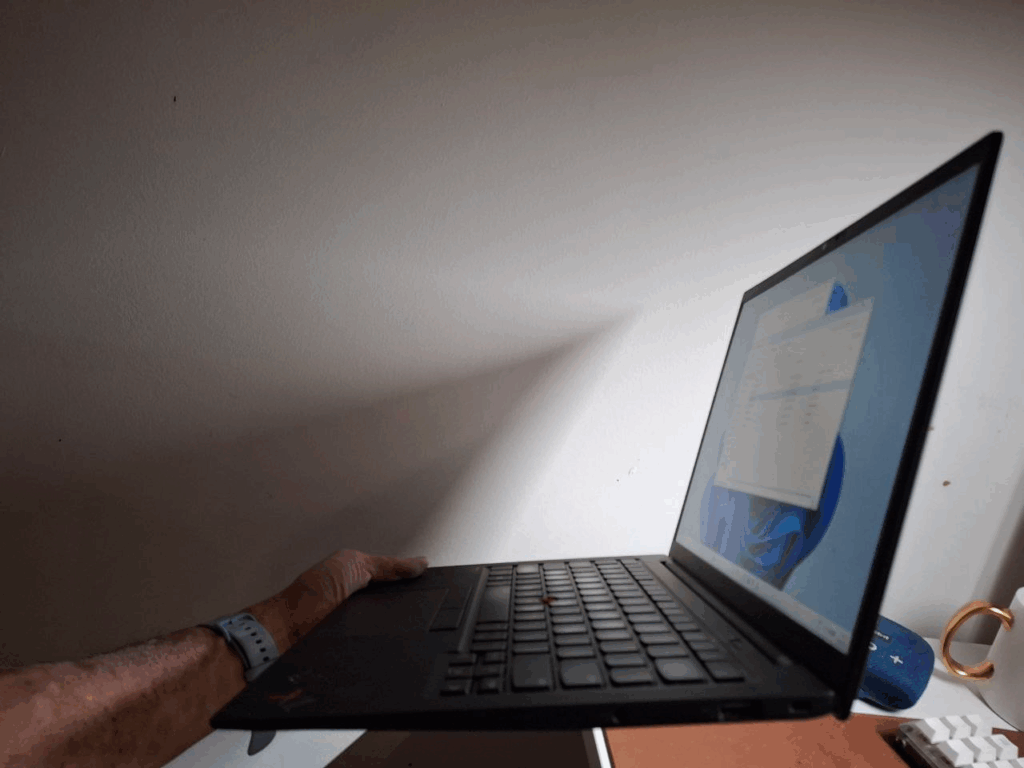
I bought a second hand X1 Carbon, specifically the 2021 9th Gen X1 Carbon.
The X1 is basically trying to have the T14 but in a carbon-fiber chassis.
A 2021 laptop is considered new to me because most of my second hand laptop in the past was about 9-years old. My dad would used to buy lorry that is 1.5 years left when he was a renovations contractor. I basically try to apply the same concept but to laptops.
The Specs of my laptop:
- Intel Gen 11 Core i7-1185G7 3.00 GHz
- 16 GB Ram (soldered)
- Intel Iris Xe Graphics (128 MB)
- 1 TB hard disk (but I eventually change it to a 2 TB NVME)
- 14 inch screen.
- 16:10 screen aspect (as oppose to the traditional 16:9 so it is taller)
- Touchscreen (but I deliberately disable it)
- USB Charging.
- 57,000 mWh battery
- Battery health 90+-%
- 1.1 KG (2.4 lb)
I bought it from an Indian guy and had to travel to like Bukit Timah for $650.
After the purchase, I immediately felt that in my goal to buy a more expensive laptop, I might have overpaid for this. But after about 10 months with this X1 Carbon Gen 9, I think its a decent price.
In its hey day as a new PC, this X1 Carbon would have cost $2200.
Your question is after 4 years, have technology improved so much such that these spec is outdated.
The answer is a firm no unless I want something really optimized for AI-workloads.
This X1 Carbon is decent for me because of a few reasons. It is so light, thin enough, yet it gives you 14 inch viewing with 16:10 aspect ratio. You would say I also have touchscreen but I have to figure out how to disable the touchscreen because I cannot stand touchscreen on a laptop. I would accidentally hit it so much.
The weight is so light that I enjoy taking it around. I am quite sure this X1 Carbon is lighter than a Mac yet it still feels damn sturdy.
I eventually brought this X1 Carbon with me on my Bangkok trip and Guangzhou trip last year. This was what I use to intensively code the Windows C# version of Gilgamesh, before I convert it with an LLM to a PHP version hosted on Investment Moats here.
Nowadays, I would bring this laptop to the office and since I am in the train by 6.30 am the train from Sengkang to Outram would usually have seats, I might do some light work while sitting down.
While the battery life is not its best performance, I find myself only needing to charge it a couple of times a week. Of course, if I do intense work, I would need to charge daily. The charging is very fast.
Suffice to say, this X1 Carbon is as power as my HM90.
16 GB in RAM is more than enough and to be fair I think an i5 processor is more than enough for most of you. I think if you are installing Linux operating system such as Linux Mint, you can make do with 8GB of RAM.
The Performance Difference Between Different Intel CPU Generations
I realize that I might have also lucked out choosing the Gen 9. I was actually looking at the Gen 8, which would be using a 10th Gen Intel CPU.
There is a significant step up in Integrated Graphics with the Iris Xe Graphics from 10th Gen to 11th Gen Intel.
If you are buying second hand laptop, you might want to get familiar with this.
In general, if you have the choice:
- At least have a Intel 8th Gen as the core count double for the U-series
- 11th Gen for better integrated graphics.
- 12th Gen – more significant multicore workload gains.
Here’s the breakdown, laptop-focused (Intel U/P-series, since that’s what’s in an X1 Carbon), highlighting where the real jumps happened vs. where it was mostly a rebrand.
6th Gen (Skylake, 2015) → 7th Gen (Kaby Lake, 2016)
Minor. Same core architecture, slightly higher clocks. Not worth chasing a generation bump here.
7th → 8th Gen (2017)
This is the first big one. Intel doubled the core count in U-series laptop chips (dual-core → quad-core). Real-world multitasking and multi-threaded performance jumped substantially — this is a meaningful line if you’re comparing a used X1 Carbon Gen 5 (7th gen) vs Gen 6 (8th gen).
8th → 9th → 10th Gen (2018–2019)
Mostly incremental — clock speed and cache tweaks, 10th gen added better integrated graphics (Iris Plus) and Thunderbolt 3 support. Not a huge CPU performance delta.
10th → 11th Gen (Tiger Lake, 2020)
Modest CPU gains (roughly 10–15%), but a big graphics/Thunderbolt 4 upgrade. Worth it mainly for I/O and display support, not raw CPU speed.
11th → 12th Gen (Alder Lake, 2021) — the single biggest jump in this whole list
Intel introduced the hybrid architecture (Performance-cores + Efficiency-cores) in laptops for the first time. The second biggest performance jump is from the 10th to 12th generation CPUs for laptops (25% increase), but generation-on-generation the 11th-to-12th jump specifically was even sharper — multicore workloads saw gains in the 50%+ range because you’re suddenly getting extra E-cores handling background tasks while P-cores focus on the active task. If your article has one “this is where it’s worth paying up for a newer used unit” moment, this is it. Laptop Study
12th → 13th Gen (Raptor Lake, 2022)
Real but smaller gain — mostly more E-cores added, modest clock bumps. There’s only a 7% performance gain from the 12th to 13th gen for laptops for the i3 line, though higher-end i7/i9 mobile parts saw a bit more from extra threads. Laptop Study
13th → 14th Gen (Raptor Lake Refresh, 2023)
Widely regarded as a rebadge with minor clock bumps. Skip this generation if you’re chasing value — a used 13th gen and 14th gen X1 Carbon perform almost identically.
14th Gen → Core Ultra (Meteor Lake / Series 1, 2023–24)
This is a different kind of jump, not a raw-speed one. Intel restructured the whole chip (tile-based design) and added an NPU for on-device AI. Raw CPU performance was actually a lateral move or slightly down in some workloads — the Core i9-14900HX notebook outperforms the Core Ultra 7 155H by more than a factor of two in heavy multi-threaded work, though that’s comparing a high-power HX chip to a thin-and-light U/H part, which isn’t quite apples-to-apples for an X1 Carbon buyer. The real story here is battery life and efficiency, not speed. PCWorld
Core Ultra Series 1 → Series 2 (Lunar Lake, 2024)
Another efficiency-focused generation. Core Ultra Series 2 processors are great for casual gaming but not intended for professional tasks requiring massive computational performance, such as 3D rendering or video editing. For everyday tasks, the Core Ultra CPUs are the better choice as they are more power-efficient while still being powerful, and if you’re looking for a laptop with long battery life, the Core Ultra CPUs are the best option right now. This is the generation where “performance” stopped being the main axis Lenovo/Intel were optimizing for in the X1 line — battery life and AI features became the pitch. Laptopmedia + 2
Core Ultra Series 2 → Series 3 (Panther Lake, 2025–26)
Latest generation, continues the efficiency/NPU trajectory with modest CPU uplift over Series 2.
The X1 Carbon Gen 9 is Cheaper Today on Carousell
A check on Carousell seems to list them at:
- i5, 16GB ram for $520
- i5, 16GB ram for $490
Man it makes me feel like a carrot head to buy an i7 at $650.
There aren’t a lot of Gen 7 X1 Carbon but more X1 Carbon Gen 6.
You can find both Intel 7th Gen and 8th Gen CPU in the Gen 6 X1 Carbon.
The Gen 6 is about 2.5 lb as compare to the Gen 9’s 2.4 lb but I think you should not feel the weight difference.
Best Decision: Changing the Hard Disk to a 2TB Samsung Evo Plus
I am also not sure what got over me, but I would usually not be too bothered with the idea that a second hand hard disk will fail on me.
But i think together with this higher grade second hand laptop purchase, I would like to see just how much of a performance boost if I go for a better hard disk.
So I bought a Samsung 990 EVO Plus 2TB PCIe Gen 4 NVME for $155.66 on Amazon.sg

Here’s the purchase detail:

Turns out that this somewhat not so urgent purchase was such a good decision because this is the price of the same damn thing today:

The price went up like 500%!
This NVMe value is worth more than my whole X1 Carbon Gen 9!
It kind of taught me that sometimes it is not about “do you need it, if you need then you buy”.
We always know that RAM and hard disk prices are volatile and cyclical but didn’t realize it will be this extreme. This and our experience with how much electricity prices can rise in shortage should affect how we view about budget planning.
Actually the KXG6AZNV512G TOSHIBA NVMe that comes with this X1 Carbon is already not bad. This is how the metrics looked:

Epilogue – Do Watch Out for the Lenovo X1 Carbon if You Need a Lighter and Sturdy Laptop
I was really glad I had the chance to experience the X1 Carbon and although I would still get battery life anxiety, I think I managed to manage it over time after going through a phase of not charging and occasional usage without bringing a charger.
If this is not something you consider, do take a look.
In 2026/27, this 2021 Gen 9 will still give you a good combination of:
- Enough ram (for the 16GB)
- Very light and carbon fiber.
- Touchscreen.
- Good processor
You are probably looking at this in the $400 to $550 range.
Second laptop at this moment make better budget sense than mini PC if you are looking for a home processing use. I would just cite this:
- 16GB DDR4 Ram (not DDR5) cost $105 – $130
- 512 GB NVMe hard disk cost $160, 1TB about $240
For most people’s workloads, if battery is not a big consideration, a 2017/2018 8/9 year old laptop with an Intel Gen 8 processor would go for $200 – $350 on Carousell.
The selling price is almost equivalent to the RAM and NVME replacement cost today!
And you get the processor, display and everything else for free.
I should know because after buying this X1 Carbon, I also bought:
- A Dell Latitude 7300 with Gen 8 i7, 16GB Ram, 512GB SATA for $200 in April 2026
- A Dell Latitude 7480 with Gen 7 i7, 32GB Ram, 512GB SATA for $230 just yesterday
I would probably write about the two of them at some point but if you value productivity per dollar cost, then the sweet spot is in the second hand market.
I like to write about these computing decision because I am also feeling my way to what is the “floor” of an essential inflexible compute productivity spend for many people.
Right now it feels very close to $250 for 2 years haha! So that is like $10 per month if you wish to make sure you can have a decent computing productivity experience as the most essential inflexible spend.
This works out to be an annual $120.
On different Safe Withdrawal Rates, you will need a portfolio capital of:
- 4%: $3000
- 3.5%: $3430
- 3%: $4000
- 2.5%: $4800
- 2%: $6000
The portfolio value for income to provide perpetual productivity compute is not really that high and many of you can achieve at least this sort of freedom. Of course, if you value a Mac experience, that is not an essential inflexible spend already. That is a discretionary need. Some would say, Kyith nowadays if you talking about a bare minimum, your $250 mobile phone can do the job, so why need another one? That is very true.
I write about these $450 Mini PC, $200 10-year old Dell Mini PC in my Living a Value Driven Lifestyle section. You might want to check them out if you share the same value.

Kyith is the Owner and Sole Writer behind Investment Moats. Readers tune in to Investment Moats to learn and build stronger, firmer wealth foundations, how to have a Passive investment strategy, know more about investing in REITs and the nuts and bolts of Active Investing.
Readers also follow Kyith to learn how to plan well for Financial Security and Financial Independence.
Kyith worked as an IT operations engineer from 2004 to 2019. Currently, he works as a Senior Solutions Specialist in Fee-only Wealth Advisory Firm Providend. All opinions on Investment Moats are his own and does not represent the views of Providend.
You can view Kyith’s current portfolio here, which uses his Free Google Stock Portfolio Tracker.
His investment broker of choice is Interactive Brokers, which allows him to invest in securities from different exchanges all over the world, at very low commission rates, without custodian fees, near spot currency rates.
You can read more about Kyith here.

Goldfish Cheddar Cheese Crackers, Baked Snack Crackers, 1 oz On-the-Go Snack Packs, 20 Count Box
$8.76 (as of October 23, 2026 03:13 GMT +00:00 - More infoProduct prices and availability are accurate as of the date/time indicated and are subject to change. Any price and availability information displayed on [relevant Amazon Site(s), as applicable] at the time of purchase will apply to the purchase of this product.)
Wireless Earbuds, Bluetooth 5.4 Headphones Bass Stereo Ear Buds with Noise Cancelling Mic, LED Display in Ear Earphones 50H Playtime Ear Buds, IP7 Waterproof for Laptop Pad Phones Workout Black
$19.99 (as of October 23, 2026 03:33 GMT +00:00 - More infoProduct prices and availability are accurate as of the date/time indicated and are subject to change. Any price and availability information displayed on [relevant Amazon Site(s), as applicable] at the time of purchase will apply to the purchase of this product.)
The Farmer's Dog Snap Sticks, Human Grade Dog Treats, Beef & Apple 3oz | Human-Grade Dog Treats for Puppies and Adult Dogs, For All Ages, Sizes and Breeds
$11.99 (as of October 23, 2026 03:23 GMT +00:00 - More infoProduct prices and availability are accurate as of the date/time indicated and are subject to change. Any price and availability information displayed on [relevant Amazon Site(s), as applicable] at the time of purchase will apply to the purchase of this product.)
Amazon Basics Crunchy & Creamy Salmon Flavor Cat Treats 16 oz. Bag
$5.75 (as of October 23, 2026 03:23 GMT +00:00 - More infoProduct prices and availability are accurate as of the date/time indicated and are subject to change. Any price and availability information displayed on [relevant Amazon Site(s), as applicable] at the time of purchase will apply to the purchase of this product.)












Post Comment