
Unlocking Hidden Power: How the GMKTec G5 Mini PC Quietly Outperforms Expectations and Could Change Your Tech Game Forever
Ever wondered if a super tiny, budget-friendly PC could really handle your everyday digital juggling act without throwing a tantrum? When I snagged the GMKTec G5 mini PC last November for just S$193 on AliExpress, I was curious — could this pint-sized powerhouse powered by Intel’s entry-level N97 processor really keep up with the demands of an everyday user like me, who streams shows, wrestles with multiple browser tabs, and dabbles in light photo editing? The answer wasn’t obvious at first glance; after all, it’s not every day you get to size up a device that’s smaller than an NVMe SSD yet promises to run Windows 11 and double-monitor setups for less than two hundred bucks. More than just a gadget review, this journey was about finding the “enough” — that sweet spot where price meets performance without the bulk or the burnout. So, let’s unpack what it’s like living on the edge of budget computing — and why sometimes, less really can be more. LEARN MORE
img#mv-trellis-img-1::before{padding-top:24.021164021164%; }img#mv-trellis-img-1{display:block;}img#mv-trellis-img-2::before{padding-top:75%; }img#mv-trellis-img-2{display:block;}img#mv-trellis-img-3::before{padding-top:44.53125%; }img#mv-trellis-img-3{display:block;}img#mv-trellis-img-4::before{padding-top:24.004192872117%; }img#mv-trellis-img-4{display:block;}img#mv-trellis-img-5::before{padding-top:72.774869109948%; }img#mv-trellis-img-5{display:block;}img#mv-trellis-img-6::before{padding-top:75%; }img#mv-trellis-img-6{display:block;}img#mv-trellis-img-7::before{padding-top:41.89453125%; }img#mv-trellis-img-7{display:block;}img#mv-trellis-img-8::before{padding-top:51.66015625%; }img#mv-trellis-img-8{display:block;}img#mv-trellis-img-9::before{padding-top:24.043715846995%; }img#mv-trellis-img-9{display:block;}

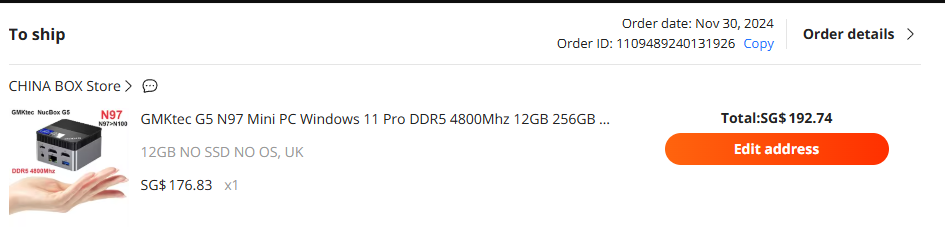
In late Nov 2024, I bought this mini PC from GMKTec call the GMKTec G5 for S$193 at AliExpress.
I credit my G5 experience with calibrating how good or poor a budget CPU is. This calibration allow me to sense just how accepting we should be buying computer with budget specs if our needs as older adults are not so demanding.
You might usually have the following requirements:
- Prefer to have a computer on a larger screen as compare to your mobile phone to do stuff.
- You watch or stream shows.
- Most of what you run are accessing software-as-a-service such as Gmail, web portals that provide particular service.
- You may frequently or occasionally run word-processing, spreadsheet and presentation deck creation on your computer.
- You might review and do photo editing.
- When you do a combination of these things, you want it to be snappy enough and not feel sluggish.
A mini PC like the G5 runs on an Intel N97 processor which would be part of Intel’s more budget friendly entry level processor.
So are they adequate to run these tasks?
That is one of the reason why I want to buy it. The second reason is that I have bought enough things from AliExpress to know it is reliable but what about something like a mini PC from a brand like GMKTec?
Since I can afford it, I might as well satisfy my mental curiosity by buying this and see how shit a budget processor can be.
And the final reason… It is so small!
Here’s my G5 stacked on top of my main mini PC Minisforum HM90 (review after using for 2-years here):

Mini PC already smaller and this one is even more absurd. I put an NVME storage disk next to it so that you can have an idea of the length.
You can genuinely bring it anywhere.
The G5’s Main Specs
The G5 comes mainly with an Intel Alder Lake N97 processor. More of that later.
The computer back 1.5 years ago, already comes with 12GB soldered on DDR5 RAM. It’s a weird number I admit.

For such a small box, the G5 have all sorts of things you would need! Lan port, but most of you will use the Realtek 802.11ac 1×1 card for WIFI and Bluetooth. Some would have reservations regarding a Realtek WIFI card and would change it to an Intel card because Realtek cards may have compatibility issues especially if you wish to install Linux on it.
But it is able to power 2 monitors on its 2 times HDMI.
It comes with Windows 11 operating system so you don’t have to get your own operating system. This whole thing for $192.
Additional Things that I Bought for This
You would notice that I did not mention anything about the storage. This is because I bought one with the storage so I need to get the storage separately. This is useful if you already have your own storage.
The default spec say that the G5 only accepts an M.2 SSD and no mentioned of NVME but a search at Reddit shows that it should be able to accomodate.
So I bought a 512GB KingSpec M.2 NVMe off AliExpress:

Kyith, is buying a China unknown storage reliable?
I don’t know, so it sometimes make sense to give it a test. Plus look at the price… man we cannot get that now already.
Long story short, 1.5 years in, the hard disk is still working.
Here is how it looks in the tests:

This same $48 suspect China storage would cost… $124 today. You can find a similar one at AliExpress here.
The G5 requires 12V and draws up to 18W in actual use, and ships with a 12V 3A USB-C power supply. The adapter is rated at 36W but the machine itself doesn’t pull anywhere near that under normal load.
What this means that if you have a 36W or more USB power adapter you can power it. I have a 65W power adapter, which can power most laptops so I use it.
Here might be some stuff that you can consider:
General Experience of Real World Usage have Been Satisfactory
For the longest time, my G5 is connected to my 55-inch TV in the living room and I would use it (in Windows 11) whenever I exercise or watch shows on a bigger screen.
So i am basically serving YouTube or Anime via a S$7 a month Zero1 200GB mobile plan through a router to a 55-inch TV. 200 GB is enough for a Kyith who consistently streams on a weekend. (More on using a mobile plan at home with a router in this post).
I think the quality of the experience depends on what you are measuring up to. I have been to my friend’s place where their computer is running Intel i7 with a Radeon or Nvidia gaming graphics card. Switching between stuff is far snappier.
This won’t reach that kind of snappy.
Last time, I would hear comments about people saying Android phones are not responsive. Then I wonder what does not responsive mean.
If you click on something it must launch the fastest. If you swipe right or left, there must be no lag.
I am there thinking… fxxk can we just appreciate that years ago we cannot even get some of these usage on such a small device on a go? Yes, there is a minimum standard that won’t make you frustrated but fxxk some of us are really demanding.
And if you are.. then you just go with a near S$2000 phone today lor.

I think you got to trust that as a financial blogger and someone who works with services in web portal, do more spreadsheet than normal people out of work, and have enough tabs open, the G5’s performance for a budget CPU is pretty respectable.
I have not much problems using a single application like Excel, Word, web surfing and watching YouTube properly. Many of these processes just require single core and a budget CPU’s single core performance are usually respectable.
Where they might struggle is when you need to switch things around and you might run into bottleneck with the CPU and if you have less RAM.
I have no problems having a fair number of tabs open and switching between applications. Yes.. they are not as responsive than the S$2400 computer I gave my brother for one of his birthday last two years but they are not frustrating enough.
For some testing purpose, we did buy a Beelink Mini PC based on an Intel N100 processor before I bought the G5 so I have the experience to test how that is like.
The Beelink PC’s role is suppose to act as a dedicated always on computer for meeting.
What I realize is that while it has no problems showing presentation slides or spreadsheet, every time you switch from the browser to another app, you can feel a noticeable lag.
It is enough for me to decide not many of you can accept that Intel N100 Windows 11 experience.
My GMKTec G5 experience has none of those.
The reason may be that the N97 has a 12W TDP while both N100 and N150 processor has 6W TDP.
TDP stands for Thermal Design Power, which is essentially how much power the chip is allowed to consume continuously. More power = more performance it can sustain. If you think in terms of pipes, the wider the pipe, the more water can flow through at any given moment.
- N100 / N150 = narrow pipe (6W)
- N97 = wider pipe (12W)
All three chips can actually run fast for a short moment — they “burst” above their TDP briefly. But they can’t hold it. Once they hit their power or heat limit, they throttle back down to what the TDP allows.
Imagine sprinting vs jogging. All three can sprint. But the N97 can sprint for longer before it has to slow to a jog. The N100/N150 slow down to a jog much sooner.
When I am watching YouTube, I am performing one task and the N100 handles it fine. But the moment I have another Gmail open, a spreadsheet in the background, and a photo I am editing, the chip is now doing several things at once. That combined load pushes it toward its ceiling fast.
The N97’s wider pipe means it handles that combined pressure without hitting the ceiling as quickly, so everything stays feeling responsive.
In a way the G5’s N97 TDP is “enough” to perform the daily tasks while the N100 and N150 TDP is not that adequate.
Since I have a power meter, my G5 usually runs average about 15W in power. This is close to the old laptop power of 20W+- and usually older laptop can do these stuff pretty ok.
I asked my LLM to help us link the usage experience (that I put above) with the CPU performance:
Streaming and shows — video decoding is handled by the iGPU. The N97’s higher TDP means it can sustain that decode workload alongside other background tasks without throttling. The N100/N150 at 6W starts getting squeezed quickly when you add anything else running simultaneously.
SaaS web apps (Gmail, portals) — modern web apps are surprisingly CPU-hungry. Browser engines, JavaScript rendering, multiple tabs — these all compete for CPU headroom. The N97 has more sustained clock speed to throw at this. The N100 and N150 boost fine initially but throttle back sooner under continuous load.
Word processing / spreadsheets / presentations — LibreOffice or Microsoft 365 on the browser are fine on all three, but when you’re doing something like opening a large Excel file while Gmail is open and a YouTube video is paused, the N97 handles that combined memory and CPU pressure better.
Photo editing — this is where the 12W budget matters most. Lightroom or even browser-based tools like Photopea lean heavily on both CPU and iGPU simultaneously. The N100/N150 can feel noticeably sluggish here.
The snappiness question — the feeling of sluggishness comes from sustained load, not peak load. All three chips can burst fast. The N97 just sustains that performance longer before the thermal/power ceiling forces it to slow down.
The N150’s iGPU clock improvements over the N100 help slightly, but since both are capped at 6W, the ceiling is the same. The N97 sits in a meaningfully higher performance tier for real-world combined workloads — not because it’s faster on paper, but because it has more room to breathe.
So there you have it.
The G5’s Single Channel RAM is a Weakness But Does Not Show Up that Much in Actual Experience.
The G5 comes with 1 soldered RAM compared to others where there are two RAM slots.
Single channel is the hidden bottleneck that makes the chip underperform what it’s actually capable of. Dual channel unlocks the full potential of the chip for real-world mixed use. It’s often a bigger practical difference than the CPU specs themselves.
In single channel, all traffic (your CPU and your integrated GPU) has to share that one lane. They take turns. When both need data at the same time, one has to wait. In dual-channels, traffic flows in both directions simultaneously. The CPU gets its lane, the integrated GPU gets its lane. No waiting, no bottleneck.
A dedicated GPU like in a gaming PC has its own separate, extremely fast memory (VRAM). It doesn’t share with the CPU at all. The N97’s integrated GPU has no such luxury and it borrows from the same system RAM the CPU is using. So when both are active at the same time, they’re both stuck on that single lane road together.
When you’re streaming a show, the integrated GPU is decoding video. When you also have a spreadsheet open and Gmail loading in a tab, the CPU is working too. On single channel, they’re now fighting each other for that one lane. That’s when you notice:
- Video stutters briefly
- Tab switching feels laggy
- Scrolling isn’t smooth
- Photo edits take a moment to render
Perhaps the performance of the G5 can be better if it is dual channel.
GMKTec Does not sell the G5 Anymore
You cannot find the G5 anymore.
It’s not that Intel is discontinuing the N97 chip but… okay they switched their direction around.
In a way, you might find this post a let down because even if you are interest, you cannot find a similar or a newer version.
But let’s see what I can come up with.
Where is the “Enough” point for Normal but not Heavy Usage.
We probably learn a little about TDP and the difference between single channel versus dual channel RAM.
I came to a point where I think most speed of CPU nowadays can do what we want.
If you have a similar use case and want similar experience as me, what you should try watching out for is:
- High enough TDP of at least 12W.
- Dual channel of RAM instead of Single channel.
The ram channel you may not have much choice as maybe in the future more mini-pc makers may cut corners and just use single RAM.
If you look at what is on older laptops and the TDP they list out this way:
Intel laptop generations (U = thin/light, H = performance)
| Generation | U-series TDP | H-series TDP | Cores (U) |
|---|---|---|---|
| 6th gen (Skylake, 2015) | 15W | 45W | 2 cores |
| 7th gen (Kaby Lake, 2016) | 15W | 45W | 2 cores |
| 8th gen (Whiskey/Coffee Lake, 2018) | 15W | 45W | 4 cores |
| 10th gen (Ice/Comet Lake, 2019-20) | 15W | 45W | 4 cores |
AMD Ryzen mobile generations
| Generation | U-series TDP | H-series TDP | Cores (U) |
|---|---|---|---|
| Ryzen 3000 (Picasso, 2019) | 15W | 45W | up to 4 cores |
| Ryzen 4000 (Renoir, 2020) | 15W | 45W | up to 8 cores |
| Ryzen 5000 (Cezanne, 2021) | 15W | 45W | up to 8 cores |
The chips will be identified with a ‘U’ or ‘H’
Of course, higher means use more power.
The new Mini PCs are always competing with the slightly older laptops. So this means you might not always want to buy a new mini PC.
You kind of need to know your use case as well:
- Are you controlling your financial budget or just want an “enough” experience?
- Are you also optimizing between performance and power because you wish for something to run 24×7
If we look at the new generation of Intel processor:
- N150 → successor to N100 (4 cores, 6W)
- N250 → successor to N200 (4 cores, 6W)
- N350 → successor to N300 (8 cores, 7W)
- N355 → successor to N305 (8 cores, 9–15W)
Perhaps only the N355 would meet up to your current needs.
What this means is that if we are looking for the sweet spot but WE WANT A NEW MINI PC, you are looking for one with an older series of chips but today. Here are some examples:

This GMKTec G3 Pro with its Gen 10 i3-10110U is actually not bad. AliExpress link here.
The TDP is 15W, which is more than the N97. The i3-10110U’s higher single-core boost clock actually matters a lot for web browsing and SaaS apps. Browsers are largely single-threaded workloads. They care more about how fast one core runs than how many cores you have. At 4.1GHz burst, it feels snappier opening tabs and loading web apps than the N97’s 3.6GHz. Dual channel RAM means YouTube and photo editing don’t suffer the iGPU bandwidth starvation the G5 has.
The weakness is only 2 physical cores. For heavy multitasking when many tabs open simultaneously while streaming and editing a spreadsheet, this can feel pressured in a way the N97’s 4 cores handle more gracefully. Hyper-Threading helps but it’s not the same as real cores.
Epilogue – I still like this G5 a lot.
Some people would diss on consumerism and says that you should spend money on experiences. But I disagree mostly for the generalization.
Sometimes, purchases like a GMKTec G5 feels dangerous, frivolous but if spending $200 helps answer a burning question that plague you for a while, then it may outweigh the value of just going on a weekend trip to Kuala Lumpur with an equivalent amount of money.
What’s important is to be in the present enough, be it with holidays or using something like a G5.
I sought to answer a question whether there is a low enough point for an “enough” PC.
I think its mainly for me to sense for most of you, what is an essential amount to spend on PC, if you are not at work, and not having so much demanding tasks.
Here is my budget that I plan for my most essential spending in 2023, which will be provided by my Daedalus income portfolio:

Can see the computer replacement is $200 a year that last 2 years so its $400. The budget adjust for 2-3 years may be $425.
I kind of learn that what is essential would be a PC that at least functions with a TDP of 15W at least.
Unfortunately, PC prices.. with RAM and Storage is a bit crazy. But I think you can squeeze such a computer within $400.
But the actual value here may be the second hand laptop market. You can get what you need for around $200-$250 if you are not too fussy.
A mini pc with its dual or triple HDMI has its place though.
I just installed Linux Mint on my GMKTec G5. Its small size may allow me to do something with it such as a web portal at home that I vibe-coded that can be access anywhere.
That is a topic for another day.
Let me know your thoughts.

Do Like Me on Facebook. I share some tidbits that are not on the blog post there often. You can also choose to subscribe to my content via the email below.
If you’re thinking of opening an Interactive Brokers account, my referral link is here.
As the new account holder, you’ll receive USD 1 in IBKR stock for every USD 100 you deposit, up to USD 1,000 in shares — so a USD 10,000 deposit gets you USD 100 in IBKR stock, and the bonus is capped at USD 1,000 for deposits of USD 100,000 or more. A few other things to know: the minimum deposit to qualify is USD 10,000, done within 30 days of opening, and the bonus shares are locked up for one year from the award date. The promotion is currently active, and using the link costs you nothing extra. On a separate note, if you haven’t already, it’s worth taking a look at how IBKR’s share price has performed over the past five years — the stock you receive as a bonus isn’t just a token; it’s a stake in a company that has done quite well for its shareholders.
I break down my resources according to these topics:
- All my personal notes about how my philosophy behind my own money and how I manage it.
- Building Your Wealth Foundation – If you know and apply these simple financial concepts, your long term wealth should be pretty well managed. Find out what they are
- Active Investing – For active stock investors. My deeper thoughts from my stock investing experience
- Learning about REITs – My Free “Course” on REIT Investing for Beginners and Seasoned Investors
- Dividend Stock Tracker – Track all the common 4-10% yielding dividend stocks in SG
- Free Stock Portfolio Tracking Google Sheets that many love
- Retirement Planning, Financial Independence and Spending down money – My deep dive into how much you need to achieve these, and the different ways you can be financially free
- Providend – Where I work and do research. Fee-Only Advisory. No Commissions. Financial Independence Advisers and Retirement Specialists. No charge for the first meeting to understand how it works

Kyith is the Owner and Sole Writer behind Investment Moats. Readers tune in to Investment Moats to learn and build stronger, firmer wealth foundations, how to have a Passive investment strategy, know more about investing in REITs and the nuts and bolts of Active Investing.
Readers also follow Kyith to learn how to plan well for Financial Security and Financial Independence.
Kyith worked as an IT operations engineer from 2004 to 2019. Currently, he works as a Senior Solutions Specialist in Fee-only Wealth Advisory Firm Providend. All opinions on Investment Moats are his own and does not represent the views of Providend.
You can view Kyith’s current portfolio here, which uses his Free Google Stock Portfolio Tracker.
His investment broker of choice is Interactive Brokers, which allows him to invest in securities from different exchanges all over the world, at very low commission rates, without custodian fees, near spot currency rates.
You can read more about Kyith here.

ALOHA Organic Plant Based Protein Bar | Peanut Butter Chocolate Chip, 12 Ct | 14g Plant-Based Protein, 10g Fiber, 5g Sugar | No Sucralose or Stevia | Non-GMO, Vegan & Dairy Free
$20.74 (as of October 23, 2026 03:13 GMT +00:00 - More infoProduct prices and availability are accurate as of the date/time indicated and are subject to change. Any price and availability information displayed on [relevant Amazon Site(s), as applicable] at the time of purchase will apply to the purchase of this product.)
Blueberries, 1 Pint
(as of October 23, 2026 03:13 GMT +00:00 - More infoProduct prices and availability are accurate as of the date/time indicated and are subject to change. Any price and availability information displayed on [relevant Amazon Site(s), as applicable] at the time of purchase will apply to the purchase of this product.)
Lavazza Super Crema Whole Bean Coffee, Medium Espresso Roast, Arabica and Robusta Blend, 2.2 lb Bag, Package May Vary (Pack of 1)
$23.77 (as of October 23, 2026 03:13 GMT +00:00 - More infoProduct prices and availability are accurate as of the date/time indicated and are subject to change. Any price and availability information displayed on [relevant Amazon Site(s), as applicable] at the time of purchase will apply to the purchase of this product.)
Goldfish Cheddar Cheese Crackers, Baked Snack Crackers, 1 oz On-the-Go Snack Packs, 20 Count Box
$8.76 (as of October 23, 2026 03:13 GMT +00:00 - More infoProduct prices and availability are accurate as of the date/time indicated and are subject to change. Any price and availability information displayed on [relevant Amazon Site(s), as applicable] at the time of purchase will apply to the purchase of this product.)











Post Comment